Setup DKIM on Postfix with OpenDKIM
April 29, 2012 at 06:50 AM | categories: Postfix, Howto, DKIM, Centos, Email | View CommentsIntroduction
DKIM is an authentication framework which stores public-keys in DNS and digitally signs emails on a domain basis. It was created as a result of merging Yahoo's domainkeys and Cisco's Identified Internet mail specification. It is defined in RFC 4871.
I previously wrote about setting up DKIM using dkim-milter, dkim-milter has since been depreciated.
We will be using the OpenDKIM implementation Centos, OpenDKIM is a fork of dkim-milter.
Installation
yum install opendkim
Generate the Keys
opendkim-genkey -d <domain_name> -s <selector>
Replace
-
.txt - contains the public key you publish via DNS -
.private - the private key you use for signing your email
Create a sub directory in /etc/opendkim/keys to store your key, i prefer to
use the domain name
# mv <selector>.private /etc/opendkim/keys/<domain_name>/<selector>.pem
# chmod 600 /etc/opendkim/keys/<domain_name>/<selector>.pem
# chown opendkim.opendkim /etc/opendkim/keys/<domain_name>/<selector>.pem
DNS Setup
You need to publish your public key via DNS, client servers use this key to
verify your signed email. The contents of
default._domainkey IN TXT "v=DKIM1; r=postmaster; g=*; k=rsa;
p=MIGfMA0GCSqGSIb3DQEBAQUAA4GNA
DCBiQKBgQDG81CNNVOlWwfhENOZEnJKNlikTB3Dnb5kUC8/zvht/S8SQnx+YgZ/KG7KOus0By8cIDDv
wn3ElVRVQ6Jhz/HcvPU5DXCAC5owLBf/gX5tvAnjF1vSL8ZBetxquVHyJQpMFH3VW37m/mxPTGmDL+z
JVW+CKpUcI8BJD03iW2l1CwIDAQAB" ; ----- DKIM default for example.com
Configuration
Edit /etc/opendkim.conf comment out "KeyFile /etc/opendkim/keys/default.private" and uncomment "#KeyTable /etc/opendkim/KeyTable"
Edit the file /etc/opendkim/KeyTable and add your domain using the following format
<selector>._domainkey.<domain_name> <domain_name>:<selector>:/etc/opendkim/keys/<domain_name>/<selector>.pem
Add your servers IP addresses to /etc/opendkim/TrustedHosts
More advanced configuration options can be set in the file /etc/opendkim.conf
Configure Postfix
You need to add the following options to the postfix main.cf file to enable it to use the milter.
smtpd_milters = inet:localhost:8891
non_smtpd_milters = inet:localhost:8891
Append the OpenDKIM options to the existing milters if you have other milters already configured.
Start OpenDKIM and restart postfix
# service opendkim start
# service postfix restart
Testing
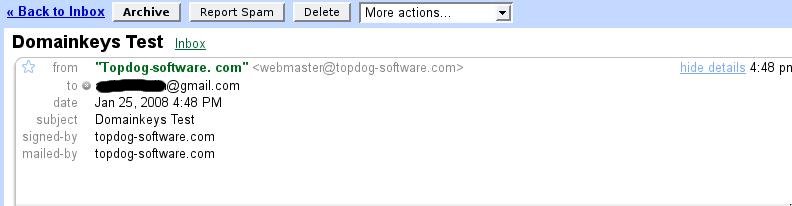
Send an email to sa-test@sendmail.net or autorespond+dkim@dk.elandsys.com, you will receive a response stating if your setup is working correctly. If you have a Gmail account you can send an email to that account and look at the message details similar to the picture below, you should see signed-by “your domain” if your setup was done correctly.
blog comments powered by Disqus
About
I am a Sysadmin and programmer, passionate about Open source software A few notable projects i am associated with are:
Contact
topdog at fedoraproject.organdrew at topdog.za.net
Follow me on Twitter

Latest blog posts
Categories
- Book review (rss) (10)
- CCSP (rss) (1)
- Centos (rss) (16)
- Certification (rss) (1)
- Cisco (rss) (1)
- CouchDB (rss) (1)
- Cyrus (rss) (2)
- DHCP (rss) (2)
- DKIM (rss) (2)
- DLNA (rss) (2)
- DNS (rss) (2)
- Domainkeys (rss) (1)
- Email (rss) (11)
- Exim (rss) (7)
- Fedora (rss) (1)
- Horde (rss) (2)
- Howto (rss) (29)
- IPSEC (rss) (6)
- IPv6 (rss) (1)
- Kickstart (rss) (1)
- Links (rss) (2)
- Linux (rss) (25)
- Mac OS X (rss) (6)
- Markdown (rss) (1)
- Mediaplayer (rss) (2)
- PHP (rss) (1)
- PS3 (rss) (2)
- Postfix (rss) (6)
- Projects (rss) (1)
- PyMYSK (rss) (14)
- Python (rss) (19)
- RHEL (rss) (7)
- SSL (rss) (2)
- Security (rss) (13)
- Sysadmin (rss) (16)
- Tips (rss) (28)
- Ubuntu (rss) (2)
- Unix (rss) (4)
Archives
- February 2014 (1)
- December 2013 (1)
- September 2013 (1)
- March 2013 (1)
- February 2013 (2)
- January 2013 (4)
- November 2012 (3)
- October 2012 (2)
- September 2012 (5)
- August 2012 (7)
- July 2012 (1)
- June 2012 (2)
- May 2012 (9)
- April 2012 (17)
- March 2012 (4)
- August 2010 (1)
- March 2009 (4)
- January 2009 (2)
- August 2008 (1)
- June 2008 (1)
- March 2008 (1)
- February 2008 (2)
- January 2008 (1)
