Setup Postfix to sign and verify Domainkeys email
March 10, 2008 at 11:54 PM | categories: Postfix, Domainkeys, Howto, Email, Centos | View CommentsIntroduction
Domainkeys is DomainKeys is a method of e-mail authentication. Unlike some other methods, it offers almost end-to-end integrity from a signing to a verifying Mail Transfer Agent (MTA). In most cases the signing MTA acts on behalf of the sender, and the verifying MTA on behalf of the receiver. DomainKeys is specified in Historic RFC 4870, which is obsoleted by Standards Track RFC 4871, DomainKeys Identified Mail (DKIM) Signatures. according to the wikipedia. So why a how to on it when there is DKIM ? Well domainkeys is still actively being used and is more widely deployed than DKIM, the developer yahoo still uses it to sign and verify mail although they are contributers to the DKIM standard.
We will be using the milter implementation of domainkeys http://sourceforge.net/projects/dk-milter on CENTOS 5.1.
Installation
Install the rpm
# rpm -Uvh http://www.topdog-software.com/oss/dk-milter/dk-milter-0.6.0-1.i386.rpm
Generate the keys
A script to do this is provided with the rpm.
# /usr/share/doc/dk-milter-0.6.0/gentxt.sh <selector> <domainname>
Where
default._domainkey IN TXT "g=; k=rsa; t=y; p=MFwwDQYJKoZIhvcNAQEBBQADS
wAwSAJBAJQfGTmsFzILU6ep6aSFg+WrTkaOLmoRillFNbOpNOr5Gst5H8wG9Oh2SpUytaru
P/7j/eWQ8Wyz6zX2gAtzwF0CAwEAAQ==" ; ----- DomainKey default for example.com
-----BEGIN PUBLIC KEY-----
MFwwDQYJKoZIhvcNAQEBBQADSwAwSAJBAJQfGTmsFzILU6ep6aSFg+WrTkaOLmoR
illFNbOpNOr5Gst5H8wG9Oh2SpUytaruP/7j/eWQ8Wyz6zX2gAtzwF0CAwEAAQ==
-----END PUBLIC KEY-----
-----BEGIN RSA PRIVATE KEY-----
MIIBOwIBAAJBAJQfGTmsFzILU6ep6aSFg+WrTkaOLmoRillFNbOpNOr5Gst5H8wG
9Oh2SpUytaruP/7j/eWQ8Wyz6zX2gAtzwF0CAwEAAQJACHWqPCf+/yW0dmv24yWY
/eIFy3PNZNNxol2YjpVIZ28SgOSRrC0vzH+SpR1WZURAOcHi+WQa0AJPeqxM4Y1g
xQIhAMVjPNPW8u0sMpNIcev9JBUjUjbilOgY2FTfyNQV0SKjAiEAwBrO5T8XLZQ6
eRUUzz7yWYCHZln6CgD0lhBuZzu4wP8CIQCq8AT2Y7ie4l6uI9fcia2czKjfNRvF
X/bAkchGutoRRwIgF2KsEQgvICNNQvQoBlqZUf/te640XAdlvubdKcABa60CIQCU
DKlMOSxHp4Ms+KT41MFHkHDI/gkFfHvVRhL1PmuwtQ==
-----END RSA PRIVATE KEY----
Install the private key
mv default.private /etc/mail/domainkeys/dk_.pem
 # chown dk-milt.dk-milt /etc/mail/domainkeys/dk_<domainname>.pem
 # chmod 600 /etc/mail/domainkey/dk_<domainname>.pem
DNS
Add the contents of
Add the following to your DNS zone file
_domainkey IN TXT "t=y; o=~"
Verify your DNS configuration http://domainkeys.sourceforge.net/policycheck.html
Configuration
Edit the file /etc/sysconfig/dk-milter and set the following options
# Default values
#
USER="dk-milt"
PORT="local:/var/run/dk-milter/dk.sock"
SIGNING_DOMAIN="<domainname>"
SELECTOR_NAME="<selector>"
KEYFILE="/etc/mail/domainkeys/dk_${SIGNING_DOMAIN}.pem"
SIGNER=yes
VERIFIER=yes
CANON=simple
REJECTION="bad=r,dns=t,int=t,no=a,miss=r"
EXTRA_ARGS="-h -l -D"
MILTER_GROUP="mail"
Configure Postfix
Add this to the postfix configuration file /etc/postfix/main.cf
smtpd_milters = unix:/var/run/dk-milter/dk.sock
non_smtpd_milters = unix:/var/run/dk-milter/dk.sock
Append to the existing milters if you have other milters already configured.
Start dk-milter and Restart Postfix
chkconfig –level 345 dk-milter on
# service dk-milter start
# service postfix restart
Testing
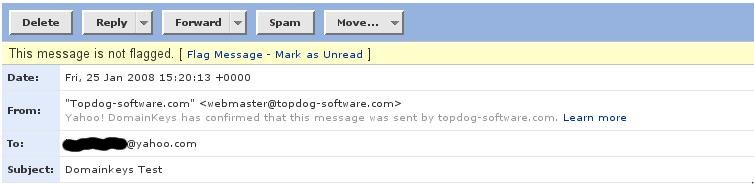
To test send a mail to autorespond+dk@dk.elandsys.com. you will recieve a response email with the test results. If you have a yahoo account you can send a mail to that as well a sample of signed message in yahoo is below
References
blog comments powered by Disqus
About
I am a Sysadmin and programmer, passionate about Open source software A few notable projects i am associated with are:
Contact
topdog at fedoraproject.organdrew at topdog.za.net
Follow me on Twitter

Latest blog posts
Categories
- Book review (rss) (10)
- CCSP (rss) (1)
- Centos (rss) (16)
- Certification (rss) (1)
- Cisco (rss) (1)
- CouchDB (rss) (1)
- Cyrus (rss) (2)
- DHCP (rss) (2)
- DKIM (rss) (2)
- DLNA (rss) (2)
- DNS (rss) (2)
- Domainkeys (rss) (1)
- Email (rss) (11)
- Exim (rss) (7)
- Fedora (rss) (1)
- Horde (rss) (2)
- Howto (rss) (29)
- IPSEC (rss) (6)
- IPv6 (rss) (1)
- Kickstart (rss) (1)
- Links (rss) (2)
- Linux (rss) (25)
- Mac OS X (rss) (6)
- Markdown (rss) (1)
- Mediaplayer (rss) (2)
- PHP (rss) (1)
- PS3 (rss) (2)
- Postfix (rss) (6)
- Projects (rss) (1)
- PyMYSK (rss) (14)
- Python (rss) (19)
- RHEL (rss) (7)
- SSL (rss) (2)
- Security (rss) (13)
- Sysadmin (rss) (16)
- Tips (rss) (28)
- Ubuntu (rss) (2)
- Unix (rss) (4)
Archives
- February 2014 (1)
- December 2013 (1)
- September 2013 (1)
- March 2013 (1)
- February 2013 (2)
- January 2013 (4)
- November 2012 (3)
- October 2012 (2)
- September 2012 (5)
- August 2012 (7)
- July 2012 (1)
- June 2012 (2)
- May 2012 (9)
- April 2012 (17)
- March 2012 (4)
- August 2010 (1)
- March 2009 (4)
- January 2009 (2)
- August 2008 (1)
- June 2008 (1)
- March 2008 (1)
- February 2008 (2)
- January 2008 (1)
